Instructions for importing game keys on Steam

What are game keys on Steam? How to change game key on Steam? The article will guide you in detail step by step.
Steam is an online game distribution platform developed by Valve, allowing users to buy, download and play thousands of computer games. Steam offers features to connect with friends, save data in the cloud, join the community and regularly organize attractive discounts.
Information you need to know
- You can install Steam on multiple computers and download your games to those machines through your Steam account.
- Many problems during Steam installation can be fixed by verifying the integrity of the game cache. This function will check if any files are missing or installed incorrectly. Just right-click on the game name in the library to open the properties menu and find this option.
- If you have any problems with the Steam app or your Steam account, consult the Steam Knowledge Base or contact Steam Support.
When you buy a game through Steam, it automatically appears in everyone’s library. However, if you buy the game through another platform like Humble Bundle, a CD key will be issued for people to activate it on Steam. In case you have never done this, the following instructions will help you enter the game key to start your gaming experience.
People can get Steam product keys through a variety of sources, such as game discount sites or printed on cards when purchased directly. These keys are combinations of letters and numbers.
The keys are specifically designed to be activated on Steam, for example, buyers cannot activate Origin or GOG keys on this platform.
It’s important to note that buyers cannot request a refund for product keys after activating them on Steam, unless the retailer allows it. The normal refund process is only valid for purchases made directly through Steam.
How to activate game key on Steam
- Launch the application Steam.
- In the top toolbar, click Games.
- Click Activate a Product on Steam.
- Select Next.
- Read the subscriber agreement and click I Agree.
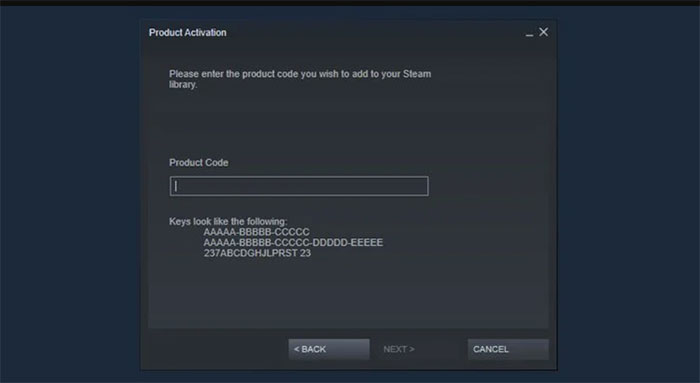
- Enter product code and click Next.
- If successful, the product will be added to the game library.
Why is the game key on Steam invalid?
When activating game keys on Steam, people may encounter invalid or duplicate code errors. This often happens if you buy a key from an unreliable website, so be aware before choosing to buy a discounted game key.
A duplicate error means the code is registered to another Steam account. One code can only be used for one account. If you are sure you have not registered the code to any other account, contact the retailer to receive a new key.
The invalid error can occur for a number of reasons, but it’s usually because the key doesn’t exist. Make sure everyone has entered the code correctly, it’s best to copy and paste the key into the box. Check for any mistaken characters, for example, the letter O may look like the number 0.
If you try again without success, contact the retailer where you purchased the key for help.
Give Steam gifts to your friends
In case you are looking for the perfect gift for a gamer friend, you can consider sending them a Steam game key. It will definitely become the most suitable and meaningful gift for them.


Post Comment