
Instructions on how to Vietnameseize the game Grand Theft Auto V (GTA 5)

In the present day, although the world’s gaming industry has been extremely developed, Game Studios continuously release blockbusters, we players enjoy great gaming experiences, and developers practice, earning hundreds of millions of dollars in revenue.
But the sad reality is that in Vietnam, there is currently no company big enough and strong enough to create such a game, or capable enough to cooperate with other game studios in the world.
Although Vietnam is a small but very potential market, however, due to many bad reasons, it has not yet been paid attention by developers.
And it is understandable that many popular games do not have Vietnamese language by default or cannot be purchased in Vietnam.
The blockbuster Grand Theft Auto V – GTA V has always had a special attraction for gamers since its launch in 2015.
That’s right, in this article I will give you detailed instructions How to Vietnameseize Grand Theft Auto V in the most detailed way.
#1. A little introduction
Regarding GTA V, I probably don’t need to introduce much more, it’s too famous and there are already a few articles on the blog about this game, you can check it out first if you don’t know.
To evaluate a game, we need to rely on many criteria such as graphics, gameplay, character building… and an indispensable part is the plot.
The biggest barrier preventing Vietnamese gamers from accessing the game’s plot is language. As I said at the beginning of the article, most games do not have Vietnamese language.
Besides, if we have Vietnamese, we may not be able to understand the plot, let alone English, especially some games with complex, mind-bending plots like NieR: Automata, for example.
From there, the need to translate foreign games into Vietnamese was born, which is called specialized language Vietnameseize the game.


In Vietnam, we currently have quite a few teams specializing in Vietnamese games, they all have their own websites – forums, the team’s products are released non-profit so anyone can use them.
Some famous translation teams include:
- Vietnamese Games (gametiengviet.com) (Formerly known as RomHackingVn group) – One of the dedicated Vietnamese groups with very quality products,
- Asian Game Association (hoigameachau.com). The name says it all, this group mainly translates games in the style of Asian knights, specifically Chinese.
- Vietnameseize the game (viethoagame.com) – I don’t know when this group was founded (~2017) and there is quite a bit of information, so far the group has produced nearly 70 game translations and has very good quality,…
And not only in Vietnam but other countries also need to translate games into their languages.
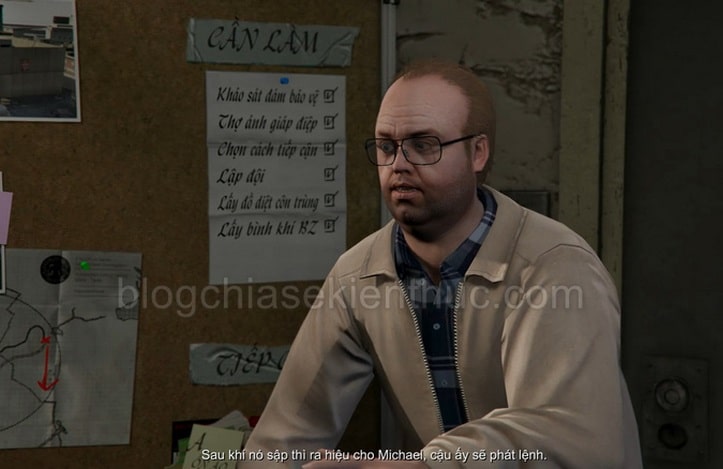
Back to our game GTA V, there are quite a few translations for this game and for me, the translation by the GameTiengViet group is the best candidate.
Simply because this translation is of very high quality, through each translation we can see their enthusiasm in it.
The dialogue in the game is translated very literally, so I do not encourage you to play in front of adults, parents or children because it contains a lot of dirty and obscene language.
Don’t misunderstand that the translation team is trying to do that, because firstly: this is an adult game, labeled Mature 17+ and secondly: the language in reality is very vulgar so it is the result of close translation. meaning.
#2. Grand Theft Auto – V Vietnamese: How to install GTA V for Epic Games, Steam, “Medication”
This translation is released by the GameTiengViet team completely free of charge, and can be used for GTA V copyrighted on Steam, Epic Games and even the “Medicine” version.
2.1. Method 1
[UPDATE] add your way @TungPrince Share below in the comments section:
Watch video tutorial:
2.2. Method 2
+ Step 1: The installation method of these 3 versions of the game is exactly the same, so you can rest assured and apply this tutorial. To prepare, first download the game’s Vietnamese translation file using one of the links below:
Link Google Drive / Link MediaFire / Link mega.nz
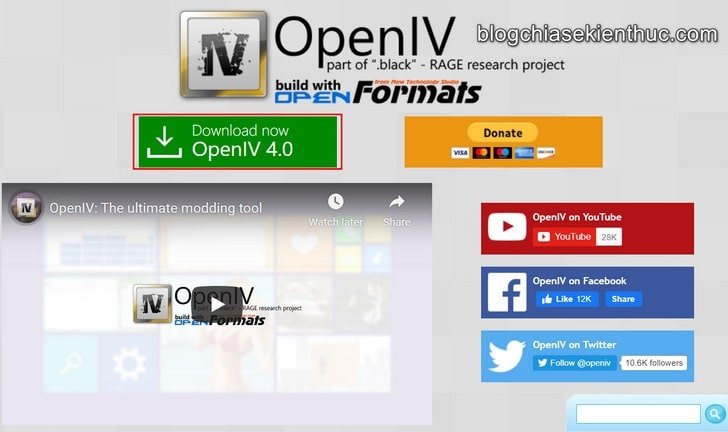
+ Step 2: After downloading, please visit the OpenIV homepage (https://openiv.com/) you will see the interface as shown below => click the button
Download now
To download the installation file of OpenIV software, the latest version is 4.0.
NOTE: If you want to mod and edit the GTA V world according to your wishes, this is indispensable software.
+ Step 3: Then you open the file
ovisetup.exe
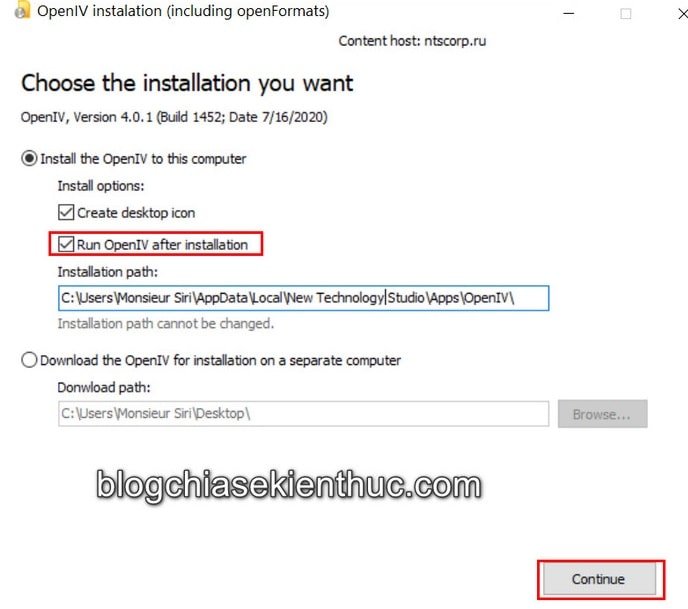
just downloaded to install OpenIV on Windows 10. The installation process is very simple so I will not give detailed instructions here, you can just
Next
Continuously is fine.
Note that at this step, please add a check mark to the line
Run OpenIV after installation
=> then click
Continue
to continue the installation.
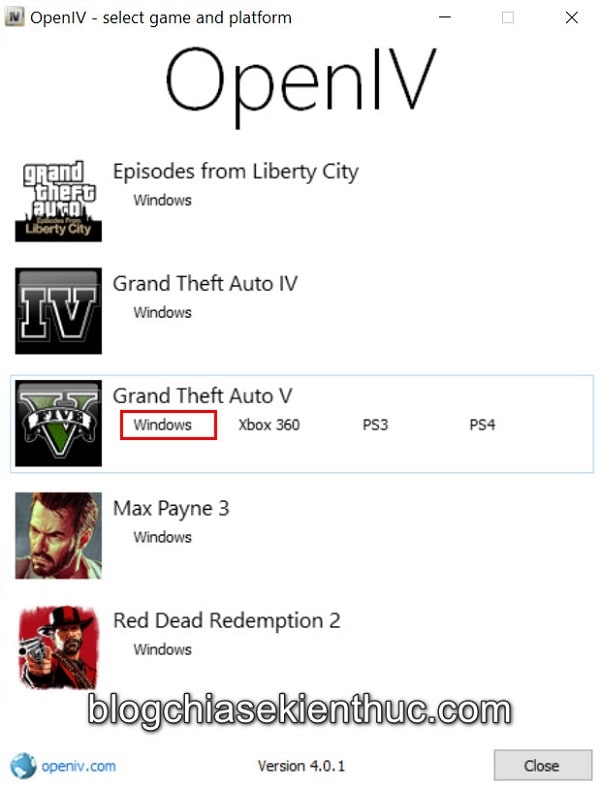
+ Step 4: After installation, the application will automatically launch with a list of games you can mod with this tool.
For those of you who don’t know, OpenIV can help you mod most of the games from Rock Star like Red Dead Redemption 2, Max Payne 3, GTA IV,… and of course there’s GTA V too.
Now click on the text
Windows
in section
Grand Theft Auto V
as shown below.
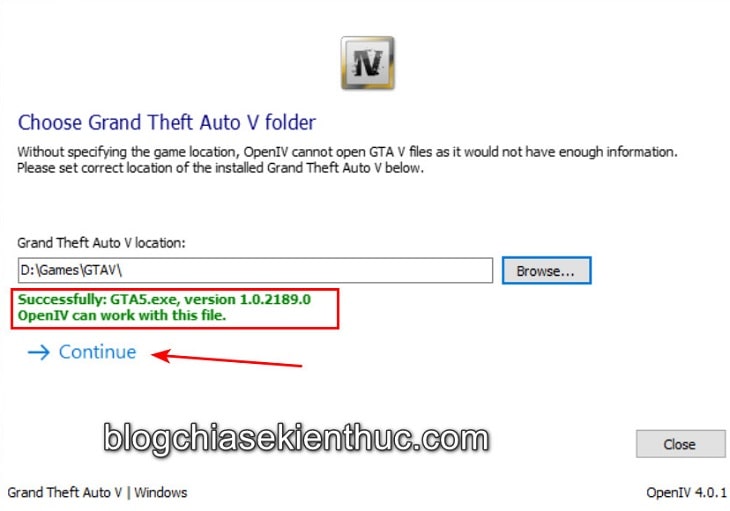
+ Step 5: Next, you need to select the path to the Grand Theft Auto V game installation folder by pressing the button
Browse…
The default GTA V Steam version’s game installation directory is:
C:\Program Files (x86)\Steam\steamapps\common\GTAV
GTA Epic Games version is:
C:\Program Files (x86)\GTAIV
As for the installation folder for GTA V “Medicine” version, I’ll accept it =)), only you know 😀
=> If you select the folder, you will see blue text
Successfully. OpenIV can work with this file
is OK, now click
Continue
to continue.
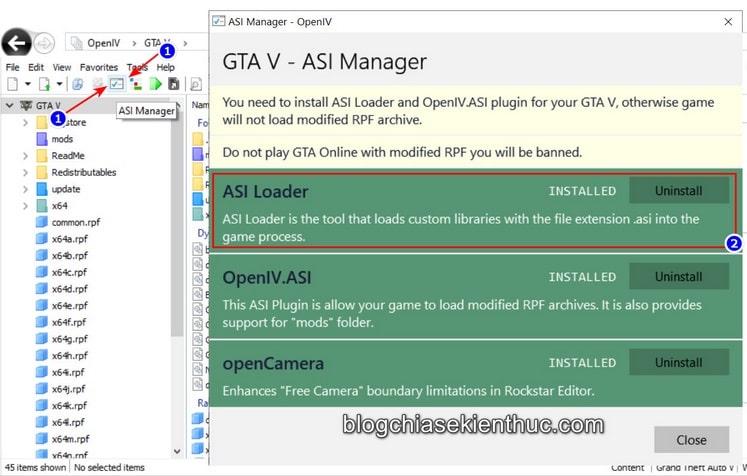
+ Step 6: Because this game translation requires you to install additional plugins
ASI Loader
then it can work and this is also a must-have plugin if you want to mod the game.
Installation is very simple, at the main interface of this OpenIV software, click on the icon
ASI Manager
will open the ASI plugin management panel as shown.
=> Finally click the button
Install
and when the ASI Loader part turns green as shown in the picture, it means it has been installed successfully.
Note : Only enable the ASI Loader plugin when you play in story mode (Offline – Story Mode), you must go here and remove this plugin if you want to play online to avoid being BAN.
+ Step 7: Now close
OpenIV
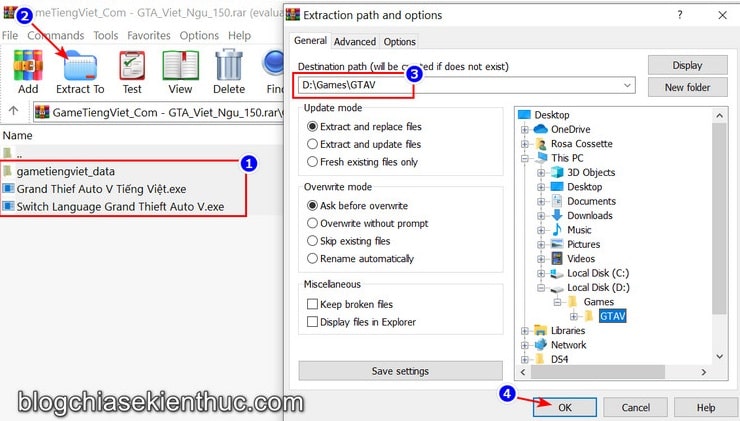
Go back and open the Vietnamese file uploaded at the beginning of the article with WinRAR
=> Then you unzip all files in the folder
Grand_Theft_Auto_V_Viet_Ngu_150
Go to the game installation folder by clicking the button
Extract to
as shown in the picture.
Unzipping the game installation folder is required. If you choose the wrong folder, you will not be able to install the Vietnamese translation of the Game. Please note !
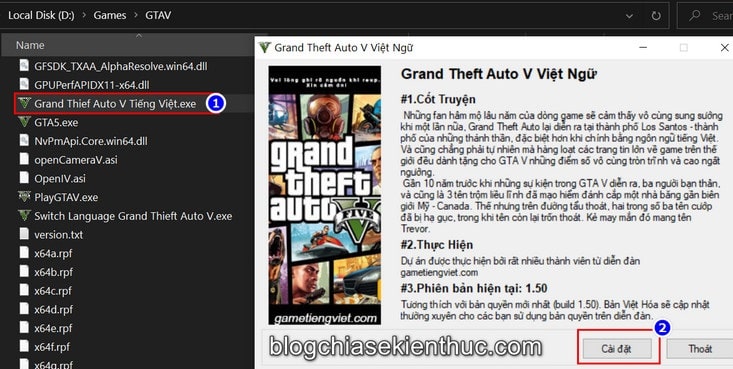
Next, you access the folder you just extracted the files above, that is, the installation folder of GTA-V, and run the file called
Grand Thief Auto V Tiếng Việt.exe
to start Vietnameseizing the game.
This window appears, the only thing left to do is press the button
Cài đặt
and wait for the automatic game translation installation process to complete. Now open the game and let’s fight!
#3. Conclusion
Yes ! So I have just given you instructions How to Vietnameseize GTA V game (Grand Theft Auto V), a very popular game in Vietnam.
Hopefully this Vietnamese version will help you have a more interesting gaming experience, understand more about the life and personality of each character more fully and completely…
If you find this article useful, don’t forget to share it so more people know this trick. Wish you have fun playing the game ^^!
Collaborator: Nguyen Thanh Tung – Blogchiasekienthuc.com
Note: Was this article helpful to you? Don’t forget to rate the article, like and share with your friends and relatives!


Post Comment